
In Uttarakhand, a ration card is more than just a document for buying subsidized grains. For many families living in hilly districts like Pauri Garhwal, Chamoli, Almora, Pithoragarh, and even urban areas such as Dehradun and Haldwani, it acts as an important support system for household expenses and access to welfare schemes.
But despite digital services improving every year, many people still get confused about where to apply, which documents are needed, and whether the process is fully online or partially offline. In reality, Uttarakhand offers both online and offline ration card application options, making it easier for citizens across rural and urban areas.
This guide explains the complete process in simple language — from eligibility and required documents to status checks and downloading your ration card online.
Quick Information
| Particular | Details |
| State | Uttarakhand |
| Department | Food, Civil Supplies & Consumer Affairs Department |
| Scheme | National Food Security Act (NFSA) |
| Application Mode | Online & Offline |
| Official Website | Uttarakhand Food Department Portal |
| Main Categories | APL, BPL, AAY, NFSA |
| Main Benefits | Subsidized food grains and welfare support |
| Processing Time | Around 15–30 days |
| Status Check | Available online |
| Download Facility | Available online |
Types of Ration Cards in Uttarakhand
The state issues different categories of ration cards depending on family income and eligibility.
APL (Above Poverty Line) Card
Issued to families above the poverty line.
BPL (Below Poverty Line) Card
Provided to low-income households eligible for subsidies.
AAY (Antyodaya Anna Yojana) Card
Issued to the poorest and most vulnerable families.
NFSA Ration Card
Covers eligible households under the National Food Security Act.
Eligibility Criteria for Uttarakhand Ration Card
Applicants should meet the following eligibility conditions before applying.
Basic Eligibility Requirements
You must:
- Be a permanent resident of Uttarakhand
- Not possess another active ration card
- Apply as one household/family unit
- Have Aadhaar-linked family details
- Belong to the eligible income category
Priority Categories
Preference is usually given to:
- Economically weaker households
- Rural laborers
- Daily wage workers
- Widows and senior citizens
- Persons with disabilities
- Families living in remote hill regions
Documents Required for Uttarakhand Ration Card
Keep all necessary documents ready before starting the application process.
Identity Proof
Any one of the following:
- Aadhaar Card
- Voter ID
- PAN Card
- Driving License
Address Proof
- Electricity bill
- Water bill
- Residence certificate
- Rental agreement
Other Important Documents
- Passport-size photographs
- Aadhaar cards of all family members
- Income certificate
- Mobile number
- Bank account details
- Old ration card surrender certificate (if applicable)
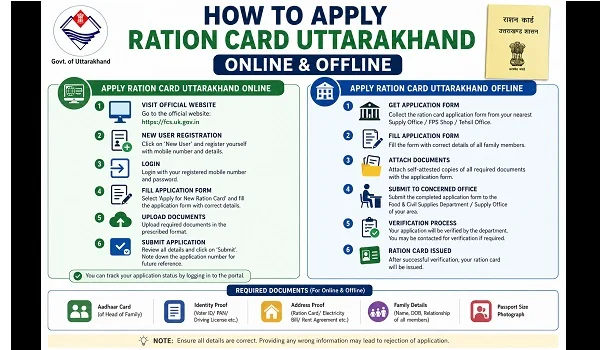
How to Apply Ration Card Uttarakhand Online
Uttarakhand citizens can apply through the official food department portal.
Step 1: Visit the Official Website
Open the official portal:
Uttarakhand Food Civil Supplies Department
Step 2: Open Citizen Services
Look for:
- Ration card services
- NFSA services
- Online application section
Step 3: Register/Login
Create an account using:
- Mobile number
- Aadhaar details
- Email ID if required
Step 4: Fill the Application Form
Provide:
- Head of family details
- Family member information
- Address details
- Income category
- FPS information
Step 5: Upload Documents
Upload scanned copies of:
- Aadhaar cards
- Address proof
- Income certificate
- Passport-size photo
Step 6: Submit the Application
Verify all information carefully and submit the form. Save the acknowledgement number for tracking.
How to Apply Ration Card Uttarakhand Offline
Offline applications are still widely used, especially in rural and hilly districts.
Step 1: Visit the Local Office
Go to:
- District Food Supply Office
- Tehsil office
- Common Service Centre (CSC)
Step 2: Collect the Application Form
Request:
- New ration card form
- NFSA inclusion form if required
Step 3: Fill the Form Properly
Enter:
- Family details
- Aadhaar numbers
- Address information
- Income details
Step 4: Attach Required Documents
Attach self-attested copies of supporting documents.
Step 5: Submit the Application
Submit the form and collect the acknowledgement receipt.
Approval Time for Uttarakhand Ration Card
The approval process depends on document verification and local inspection.
| Process | Estimated Time |
| Initial verification | 7–10 days |
| Local inspection | 1–2 weeks |
| Final approval | Around 15–30 days |
Applications with incomplete information may take longer.
How to Check Uttarakhand Ration Card Status
Applicants can track their application online.
Steps to Check Status
- Visit the official portal
- Open ration card services
- Select “Application Status”
- Enter:
- Application number
- Registered mobile number
- View the latest status
Official website:
Uttarakhand Ration Card Services
How to Download Uttarakhand Ration Card
Approved applicants can access ration card details online.
Download Process
- Visit the official portal
- Open ration card section
- Search using:
- Ration card number
- Applicant name
- Download or print the ration card details
Conclusion
Applying for a ration card in Uttarakhand has become easier with improved online services and local support centers across the state. Whether you live in a city or a remote hill district, the process can be completed smoothly if your documents and Aadhaar details are accurate.
For eligible households, the ration card remains an important document that supports food security and provides access to multiple welfare schemes. Always use the official government portal and authorized offices while applying to avoid delays or misinformation.

Leave a Reply